The family wall calendar, without the $300 screen
Turn a tablet you already own into your family's calendar, meal plan and chore chart. Set up in about ten minutes.
Free for 30 days · No card needed · Name and email only
A wall calendar screen: $300 to $700, and most charge a subscription for the extras. HouseChief: $0 for the screen, $99 a year.
What a wall calendar really costs in year one
A dedicated family calendar screen is a device to buy, and most come with a subscription for the features families want most. HouseChief has no device to buy: the wall display runs in the browser on a tablet you already have.
| Item | Device | Subscription | Year one |
|---|---|---|---|
| HouseChief, yearly | $0 (any tablet, phone or computer) | $99/year | $99 |
| HouseChief, monthly | $0 | $9.95/month | $119.40 |
| Skylight Calendar 2 (15") | $299.99 | Calendar Plus, $79/year after a free month (optional) | $378.99 with Plus ($299.99 without) |
| Hearth Display | $699 | Family Membership, required to set up: $86.40/year or $9/month after 30 days free | $785.40 with the yearly membership |
Prices checked November 2026. Device and plan prices are from each company's own website, before tax, shipping and sales. HouseChief's year one counts 12 months of the plan after the free trial. HouseChief needs a tablet; if you don't have one, add its price.
Free for 30 days · No card needed · Name and email only
Set it up in ten minutes
Start your free trial on any phone or computer
Sign up at housechief.app/join with your name and email. No card is needed for the 30 days.
Turn the tablet into the wall display
On the tablet, sign in to HouseChief, add it to the Home Screen, and open Wall display. It fills the screen, stays awake while it's open, and refreshes itself every minute.
Connect your calendars and add the kids
Connect Google Calendar, iCloud or Outlook in Settings, add each kid (no email or password needed), and prop the tablet up in the kitchen.
The longer walk-through, with stands and mounts, is turn a tablet you own into a wall display.
What the family sees on the wall
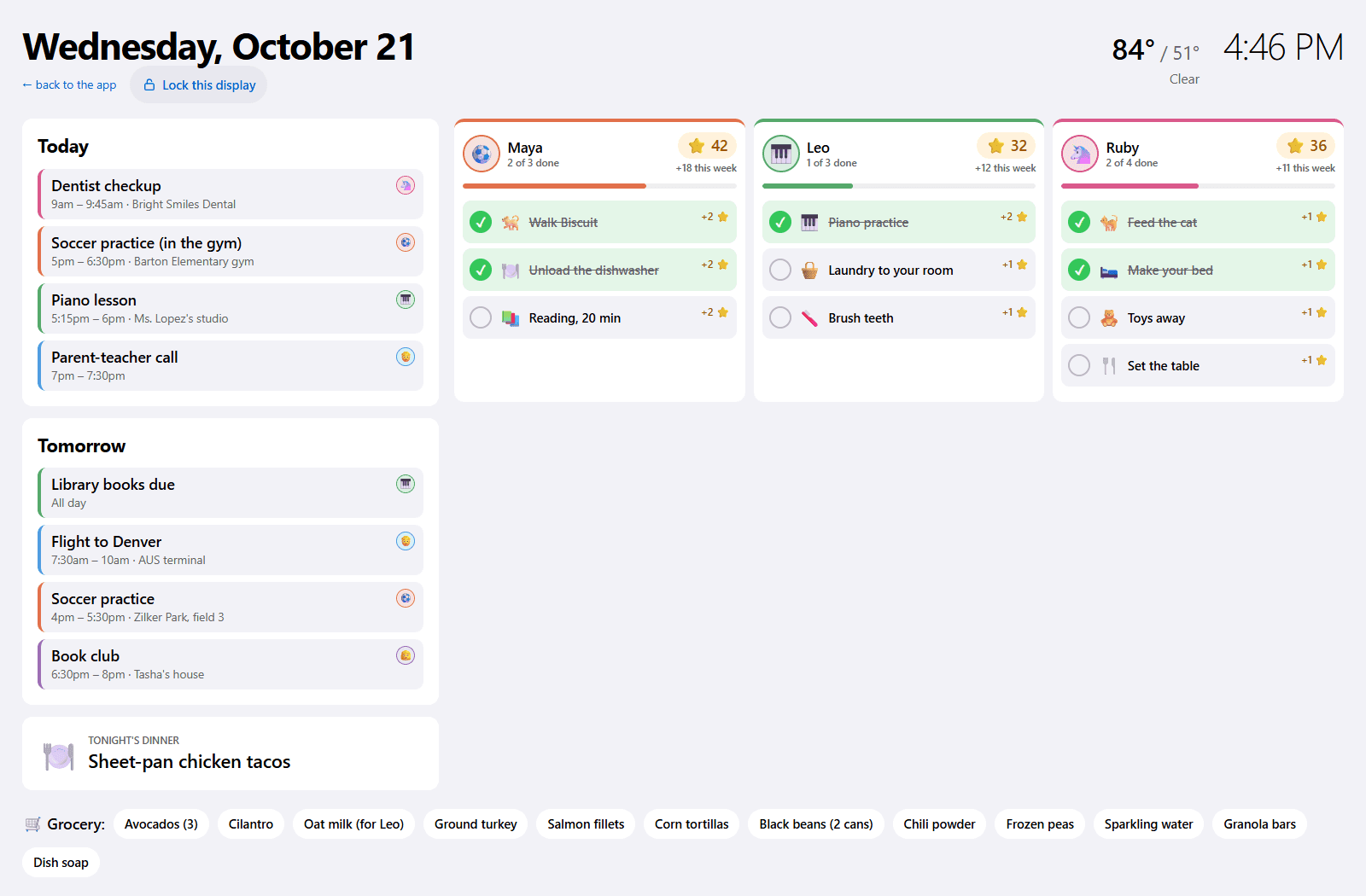
The wall display shows today and tomorrow, each kid's chores, and what's for dinner, big enough to read from across the kitchen. Everyone keeps using HouseChief on their own phone, and changes show up on the wall within a minute.
- Two-way calendar sync with Google Calendar, iCloud and Outlook.
- Meals and an aisle-sorted grocery list, planned for the week and shared with every parent.
- Kids' chores with stars and rewards: kids tap their own column, no login needed.
- Dims at night, from 9 p.m. to 6 a.m., so it isn't a bright screen in a dark kitchen.
Built by a Dallas family for our own kitchen.
Free for 30 days · No card needed · Name and email only
When a dedicated screen is the better fit
Choose Skylight or Hearth if you want a screen made only for the wall, bigger than the tablet you own, with nothing to set up on a tablet. Choose HouseChief if you'd rather use a tablet you already have, want the same organizer on every parent's phone, and want an AI planner that waits for a parent's Approve before it changes anything. See the full comparisons with Skylight Calendar and Hearth Display.
Questions
Do I need a card?
No. The 30-day trial needs only your name and email. Subscribe in Settings when you're ready; nothing is charged unless you subscribe.
What tablet works?
Any tablet with a current web browser works, such as an iPad or an Android tablet. An older tablet you already have is fine if its browser is up to date. The wall display runs in the browser, so there's nothing to install. Keep it plugged in.
Is my family's data private?
HouseChief does not show ads inside the app, and family data is never sold. When advertising measurement is turned on, Meta (Facebook and Instagram) can count a page view, a sign-up, and a finished sign-up. Kids' names, chores, calendars, photos and chats are not sent to Meta. Google, Microsoft (Bing) and TikTok can count visits to our public pages, a sign-up form being sent, and a new family's trial start; their tags don't run inside the app. Read the privacy summary.
Can I switch between monthly and yearly?
You choose monthly ($9.95) or yearly ($99) when you subscribe in Settings. To change a plan you already have, contact support and we'll help.
Sources
Skylight and Hearth are trademarks of their owners. HouseChief isn't affiliated with or endorsed by either company. Their prices come from these official pages, as of November 2026.