Compare
HouseChief vs Skylight vs Hearth: the screen you buy or the one you own
Skylight and Hearth each sell a screen for the wall. HouseChief is the family organizer in a browser, on a phone, tablet or computer you already own, including a wall display on a tablet you mount yourself. This page compares features only. For what each company charges, use the links under Sources. Features checked October 28, 2026.
Skylight Calendar and Hearth Display side by side
Details as of October 28, 2026, from each company's own website. Sources are listed below.
| Feature | Skylight Calendar | Hearth Display | HouseChief (your tablet) |
|---|---|---|---|
| What you use | A touchscreen calendar Skylight sells, plus the Skylight app | A display Hearth sells, plus the Hearth companion app | Any browser on a phone, tablet or computer you own |
| On the wall | Their device, plugged in, on Wi-Fi | Their display, mounted on the wall | A tablet you already own, in the browser |
| Calendars | Syncs Google, Outlook, Apple, Cozi, Yahoo, and a public calendar link | Hearth's page says Google, iCal and Outlook | Two-way Google Calendar, iCloud and Outlook, plus ICS links |
| Chores | Tasks Manager checklist included | Routines, rewards and streaks with Family Membership | Stars, streaks and rotation. Kids need no email. |
| Meals | Meal planning with Calendar Plus | Meal planning with Family Membership | Week grid, recipe box, aisle-sorted grocery list |
| School email and flyers | Magic Import with Calendar Plus: an email, a PDF, or a photo | A photo of a flyer, via Hearth Helper | Forward to the family address. A parent approves in the Inbox. |
| AI | Magic Import with Calendar Plus | Hearth Helper with Family Membership | Chief of Staff on frontier AI models. A parent approves calendar changes. |
| Price | On Skylight's site | On Hearth's site | Free for 30 days, then $9.95/month with base AI usage included, plus paid AI usage beyond that |
A screen they sell
Skylight's calendar page describes a dedicated touchscreen, a mobile app, and setup Skylight says takes 10 minutes or less. The page says the device syncs with Google, Outlook, Apple, Cozi and Yahoo, and with a calendar that has a public link. Included on that page: a Tasks Manager for chores and routines, color coding, lists, and day, week, month and schedule views. Calendar Plus, which is optional, adds rewards, meal planning, a photo screensaver, Magic Import and Disney Mode. Magic Import is how Skylight describes turning a forwarded email, a PDF, or a photo of a flyer into calendar items.
Hearth's product page describes a wall display and a companion app. The page says a Family Membership is required to set the display up. A FAQ on the same page says calendars and profiles are ready without it, and that you can sync Google, iCal and Outlook immediately, with membership unlocking Hearth Helper, routines, to-dos and meal planning. Both sentences are on Hearth's page as of October 28, 2026. Check that page for which rule applies when you buy. Hearth Helper is their assistant. The page says you can snap a photo of a flyer and send it to Hearth Helper.
A screen you already own
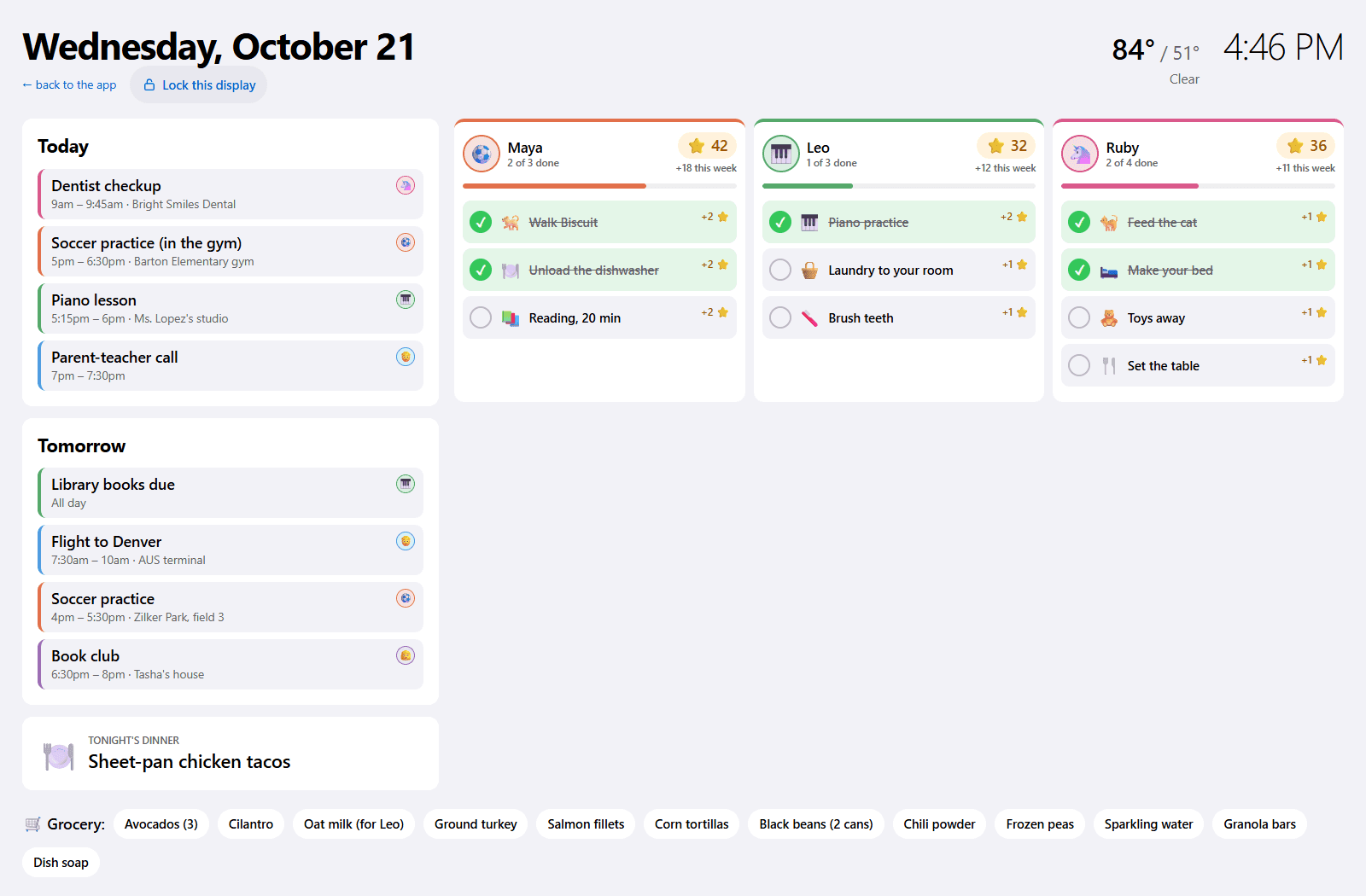
HouseChief does not sell a device. The wall display is a browser page on a tablet or spare screen you already have: today and tomorrow, each kid's chores, dinner, the grocery list and the weather. It dims at night. You supply the tablet and the mount. The same account works on a phone and a computer, also in the browser. There is no App Store or Google Play app to download.
Calendar sync is two-way with Google Calendar, iCloud and Outlook, and one-way for a school or team link. School email is a forward to your family's address, then Approve in the Inbox, including a photo of a paper flyer. The Chief of Staff proposes calendar and meal changes and waits. Kids use a view with no email or password. A read-only link covers grandparents and sitters.
Which one fits
Choose Skylight if you want their touchscreen on the wall and their app, and you are fine plugging the device in. Choose Hearth if you want their display and companion app, and you have read their current membership rule. Choose HouseChief if you would rather not buy a screen, and you want the organizer in a browser with a parent approving calendar changes.
Prices change, and this page does not list theirs. Skylight's current price is on the Skylight Calendar page. Hearth's is on the Hearth Display page. For a different shape of family app, see the Cozi comparison.
What this page leaves out
No rankings, no star ratings, and no counts of families. Skylight and Hearth publish reviews and customer numbers on their own sites. Those are theirs to host. This page does not repeat them, and HouseChief does not publish a family count of its own.
Hardware details that change with the model (screen size, stand, mount) stay on the product page too. If you are deciding on a specific Skylight size or a Hearth frame color, read that page the same day. The only HouseChief claim here is the one the product actually makes: a browser, a tablet you already own, and a parent approving calendar changes.
Sources
Skylight Calendar and Hearth Display are trademarks of their respective owners. HouseChief isn't affiliated with or endorsed by either company. Their details come from these official pages, as of October 28, 2026.
Questions
Do I have to buy a screen to use HouseChief?
No. HouseChief runs in a browser on a phone, tablet or computer you already own. The wall display is that same browser on a tablet. Skylight and Hearth each sell their own screen. Their current prices are on their sites, linked below.
Does this page list Skylight or Hearth prices?
No. Features were checked on October 28, 2026, from each company's own product page. For what Skylight or Hearth charges today, use those pages under Sources. A dollar figure copied here would go stale the next time they change it.
Where is HouseChief the better fit, and where not?
HouseChief fits a family that wants a browser and a tablet they already own, with calendar changes waiting for a parent's Approve. Skylight or Hearth fit a family that wants a screen built and sold for the wall. Hearth's own page is the place to confirm whether a membership is required to set up.