Compare
Skylight vs Hearth: which family wall calendar should you buy?
Pick Skylight if you want the lower price and a device that keeps working without a subscription; the 15-inch Calendar 2 is $289.99 and chores, lists and calendar sync are included. Pick Hearth if you want a large portrait screen with kid routines, rewards and an AI helper built in from day one, and you are fine paying $699 plus a required membership. There is a third path. If you already own a tablet, you can get a kitchen wall display with calendar, chores, meals and an AI assistant for free. More below.
Skylight Calendar and Hearth Display side by side
Details as of October 2026, from each company's own website. Sources are listed below.
| Feature | Skylight Calendar | Hearth Display | HouseChief (your tablet) |
|---|---|---|---|
| Price | $149.99 (10 in), $289.99 (15 in Calendar 2), $569.99 (27 in Calendar Max), as of October 2026 | $699.00, as of October 2026 | Free while in early access; uses a tablet you own |
| Screen size | 10, 15 or 27 in diagonal | 27 in diagonal, 16.5 in wide by 26.7 in tall | Whatever tablet or screen you have |
| Subscription | Calendar Plus, $79/year, optional | Family Membership, $9/month or $86.40/year; product page says required to set up, FAQ says core features work without it | None |
| Calendar sync | Auto-sync with third-party calendar apps, included without Plus | Google, iCal and Outlook, plus URL calendars like TeamSnap, included | Two-way with Google, iCloud and Outlook, plus subscription links |
| Chores | Chore chart and task manager included; rewards need Plus | Routines, chores, stars, streaks and rewards with membership | Chores, stars, streaks and a parent-approved rewards store |
| Meals | Meal planning needs Plus | Meal schedule per person; AI meal suggestions with membership | Weekly meal grid, recipe box, aisle-sorted grocery list |
| AI | Magic Import with Sidekick (forward school emails) needs Plus | Hearth Helper: text it events and meal plans, adds events from a photo | Chief of Staff: plans and drafts; asks before changing your calendar or meals, and grocery adds can be undone |
| Kids' logins | Not described on the pages we checked | Unlimited profiles with a color each; no separate kid login described | Kid profiles with no email or password; parent PIN |
| What it does not do | Calendar Max is wall-mount only; must be plugged in; meals, rewards and email import are paid | Needs a membership to finish setup; no dedicated grocery list described; wall-mount only | No dedicated hardware; no app store app (runs in the browser) |
Skylight Calendar
Prices and features were checked in October 2026 on myskylight.com and hearthdisplay.com. Both companies change pricing and bundles often, so confirm before you buy. HouseChief is not affiliated with either company.
Skylight sells three sizes. As of October 2026 the compare page lists the 10-inch Calendar at $149.99, the 15-inch Calendar 2 at $289.99, and the 27-inch Calendar Max at $569.99. A refurbished 15-inch model is $179.99. All run a mobile app for Apple and Android, with a 4-month return window on purchases from myskylight.com.
Strengths
It works without paying monthly. Skylight's compare page marks calendar auto-sync, the chore chart and task manager, custom lists, the mobile app and customer service as included on every model. A family that wants a wall calendar with chores can buy the device and stop.
Price. The 15-inch Calendar 2 is less than half the price of Hearth. Even the 27-inch Calendar Max is $130 less than Hearth's one 27-inch model.
Sizes and placement. The 10 and 15-inch models can sit on a counter or hang on a wall. If you are not ready to drill, that matters.
Weaknesses
The best features are behind Calendar Plus. Meal planning, rewards, the photo and video screensaver, Disney Mode, and Magic Import with Sidekick (forward school emails to import events) are Plus features at $79 per year. If those are why you want a family display, add $79 a year.
It is a calendar first. The free tier is a calendar with a chore chart. Routines for younger kids, meals and rewards are add-ons rather than the core of the product.
Hearth Display
Hearth sells one device: a 27-inch portrait display, 16.5 inches wide and 26.7 inches tall, listed at $699.00 as of October 2026. The box includes a mount, power cord and three frame options. The product page also lists 12-month financing at $63.09 per month.
Strengths
Built around kids' routines. Hearth's features page describes visual routines with kid-friendly icons, routines "designed by parenting pros," streak tracking, stars for completing routines and to-dos, and rewards kids can pin as goals. If your main problem is mornings and bedtimes with young children, Hearth leans harder into that than Skylight.
Hearth Helper. You text it events and meal plans and it turns them into a schedule for your approval. The product page says it can suggest meals from preferences, dietary needs or what is in the fridge, and add events from a photo of an invite or flyer.
Profiles for everyone. Unlimited profiles, including sitters, grandparents and pets, each with a color, photo and saved emergency and allergy details.
Weaknesses
The membership is effectively required. Hearth's product page says "Membership is required to set up your Hearth Display and to access all premium features." The Family Membership is $9.00 per month, or $7.20 per month billed as $86.40 per year, with cheaper 2-year and 3-year terms. The first month is free. Hearth's own FAQ adds that core features like calendars, syncing and profiles work without it. The real first-year cost with the membership is roughly $785 at the annual rate, before tax.
Price. $699 is a lot for a kitchen calendar. Hearth's own reviewer quote calls it "an investment."
Wall only. The display ships with a mount. No countertop option is described.
Lists are general. The features page describes reusable lists but not a dedicated, aisle-sorted grocery list.
The free option: a tablet you already own
Both devices are, at their core, a screen on the wall running a family calendar app. Most families already own that screen.
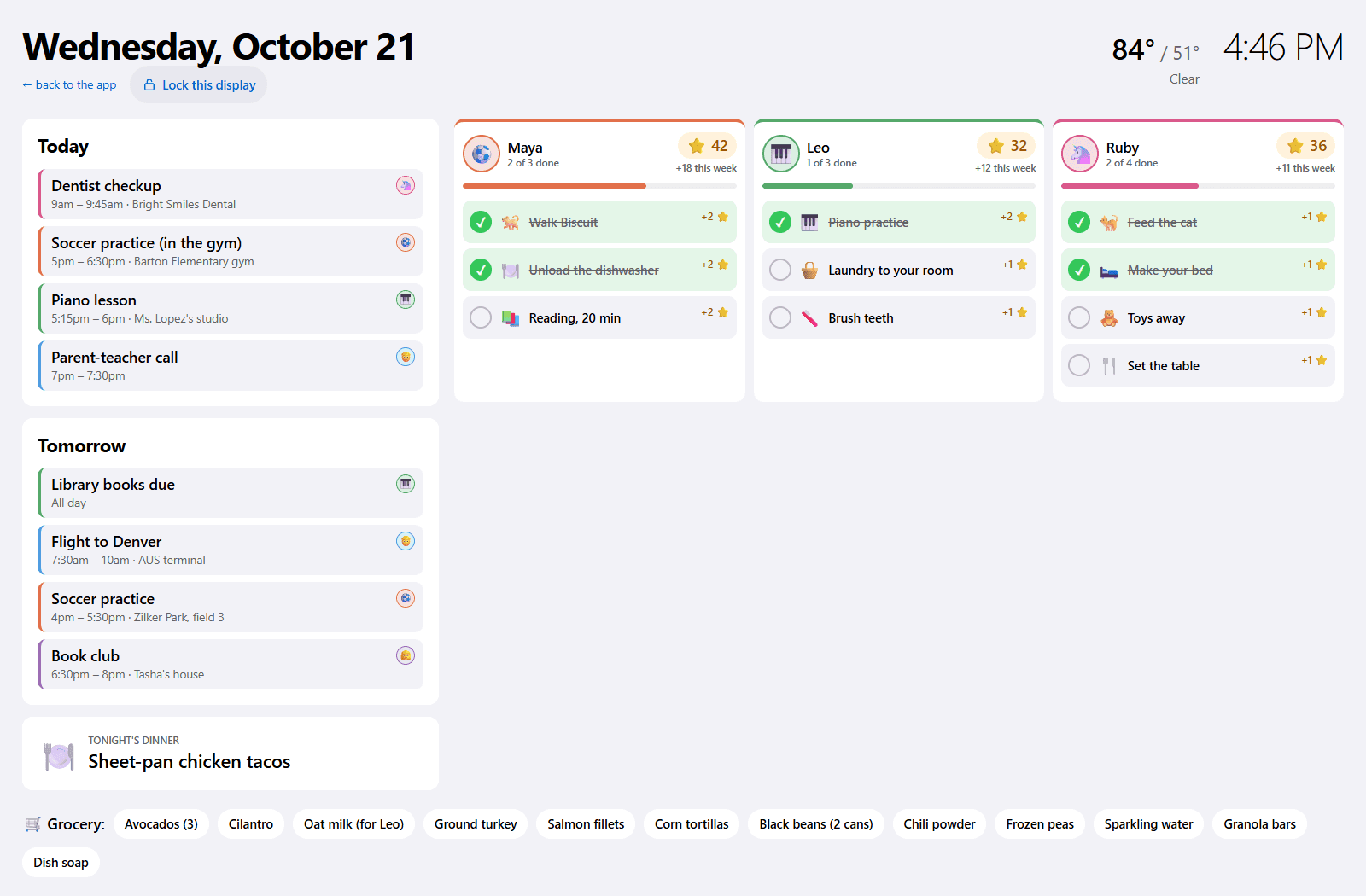
HouseChief runs in the browser on any tablet and has a wall display mode built for this: a full-screen layout that shows today's and tomorrow's events, tonight's dinner, each kid's chores with large checkboxes, and part of the grocery list. It refreshes every minute and dims from 9 p.m. to 6 a.m. Parents-only lists, settings and the Inbox never show on the wall.
The rest lines up with what you would pay for above:
- Two-way calendar sync with Google Calendar, iCloud and Outlook, plus school and sports calendars by subscription link.
- Chores that earn stars and streaks, assigned to one kid, anyone, or rotated between siblings, with a rewards store parents approve.
- A weekly meal grid, recipe box and aisle-sorted grocery list.
- An AI Chief of Staff that plans, writes a morning briefing and proposes changes, and waits for a parent to approve calendar, meal and email changes.
- Forward school emails to a family address and the dates land in your Inbox for approval.
- Kid profiles with no email or password, and a parent PIN.
It is free while in early access, with every feature included. There is no App Store or Google Play app; you add it to the home screen from the browser. The trade-off: you supply the hardware, and a five-year-old tablet will not look as sharp as a new 27-inch panel.
Who each one is best for
Skylight is best for a family that wants a dedicated screen at the lowest price, mostly needs a shared calendar and chore chart, and would rather not pay a subscription. Add Plus later if you want meals and rewards.
Hearth is best for a family with young kids that wants routines, rewards and an AI helper built in, likes a tall portrait screen, and has budgeted for the device plus the membership.
A tablet with HouseChief is best for a family that already owns a tablet, wants the same calendar, chores, meals and AI on the kitchen wall, and does not want to spend anything to find out whether a wall display changes their week.
How HouseChief compares
HouseChief is not a device. It is a family organizer that runs in the browser and turns a tablet you already own into a kitchen wall display, with the calendar, chores, meals, grocery list and AI assistant that Skylight and Hearth charge for, free while in early access. It is the right choice when you want to try a wall display before spending $300 to $800 on hardware. Read the full Skylight Calendar alternative comparison, or get started at housechief.app/join.
Sources
Skylight Calendar and Hearth Display are trademarks of their respective owners. HouseChief isn't affiliated with or endorsed by either company. Their details come from these official pages, as of October 2026.
Questions
Is Hearth better than Skylight?
Hearth has deeper kids' routines, rewards and an AI helper included with its membership, and a larger portrait screen. Skylight is cheaper, comes in three sizes, and works without a subscription. Which is better depends on whether you value the routines and AI enough to pay $699 plus a required membership.
Does Skylight Calendar require a subscription?
No. As of October 2026 Skylight's compare page lists calendar sync, the chore chart, lists and the mobile app as included. Calendar Plus is $79 per year and adds meal planning, rewards, the photo screensaver, Disney Mode and Magic Import for school emails.
Does Hearth Display require a subscription?
For most features, yes. Hearth's product page says a membership is required to set up the display and use its premium features, though its FAQ says core features like calendars, calendar sync and profiles work without one. The Family Membership is $9 per month, or $86.40 per year, with the first month free, as of October 2026.
Can I get the same features without buying a device?
Yes. HouseChief runs in the browser on a tablet you already own and has a wall display mode with calendar, chores, dinner and the grocery list, plus two-way calendar sync and an AI Chief of Staff. It is free while in early access.