Compare
An Ohai alternative built around one household
Ohai is a household assistant you text, talk to, or forward email to. HouseChief is one household's organizer in the browser: calendar, chores, meals and lists, with calendar and meal changes waiting for a parent to tap Approve. This page uses only Ohai's own site, checked November 9, 2026. Prices stay on each company's site.
HouseChief and Ohai side by side
Competitor details as of November 9, 2026, from Ohai's own website. Sources are listed below.
| Feature | HouseChief | Ohai |
|---|---|---|
| How you ask | Type or talk in the browser. There is no text-message assistant. | Ohai's how-it-works page says you text Ohai, forward emails, or upload screenshots, PDFs and photos. The home page also says you can talk. |
| How dates reach the calendar | Forward a school or coach email from a parent's address. Dates land in the Inbox until a parent taps Approve. A school or team calendar can also be added by a read-only subscription link. | How it works says school and sports dates are added without manual entry. The home page FAQ says Ohai suggests actions such as adding events to the calendar. |
| Calendar sync | Two-way Google Calendar, iCloud and Outlook. | Ohai's home page FAQ says it syncs with Google Calendar, Outlook and Apple Calendar (iCal). How it works says events go to the right calendar. The pages checked do not use the words two-way. |
| AI and human help | A Chief of Staff on frontier AI models. It can add a list item, list or project you asked for, with Undo. Calendar and meal changes, emails and website submits wait for a parent to tap Approve. | How it works says updates are organized into events, tasks and reminders. Ohai's home page FAQ, Is there human support behind the AI?, says human assistants can step in when something is complicated, like a detailed school schedule or document. |
| Chores and rewards | Stars, streaks and rotation. Kids pick a reward; a parent confirms it before stars are spent. Kids need no email. | Not described on the Ohai pages checked November 9, 2026. |
| Meals and groceries | A week grid, a recipe box and an aisle-sorted grocery list. HouseChief does not place the grocery order. | How it works says Ohai recommends meals, builds a grocery list, and connects with Instacart so ingredients can be delivered. |
| Wall display | Wall display mode on a tablet or spare screen you already own. HouseChief does not sell a screen. | A wall display was not described on the pages checked November 9, 2026. |
| One household or several | One household. Kids are profiles with no email. Helpers get a read-only share link. Two homes do not share one family. | How it works says shared circles let adults connect calendars and coordinate, even across households. |
| Where it runs | A web app in the browser on a phone, tablet or computer. You can add it to the Home Screen. | Ohai's how-it-works page says it has a mobile app for iPhone and Android. |
| Morning summary | A morning briefing with today's calendar, meals, the kids' chores, home care that is due, and the weather. | How it works describes a Daily Summary of family schedules, tasks, reminders and priorities. |
Texting an assistant, or one household's organizer
Ohai's home page says you send a text, forward an email, or speak a request, and Ohai turns that into plans, reminders and schedules. Its how-it-works page says the same capture in three moves: text, forward, or upload a screenshot, PDF or photo. That is a real fit if the week arrives as messages on your phone.
HouseChief has no text-message assistant. You open it in a browser on a phone, tablet or computer, and you can add it to the Home Screen. Parents sign in. Kids are profiles with no email. A grandparent or sitter gets a read-only share link, not a second login. Two homes do not share one family. A neighbor in this category is Jam, which also takes a forwarded email.
How dates get onto the calendar
Ohai's own pages do not say this the same way. How it works says school and sports dates are added to the family calendar without manual entry, and that events go to the right calendar. The home page FAQ says Ohai suggests helpful actions, such as adding events, creating reminders or generating tasks. This page reports both and does not pick one.
In HouseChief, a parent forwards the email to the family's HouseChief address. The dates land in the Inbox, and nothing is added until a parent taps Approve. A list or project you asked for is created with Undo. Calendar and meal changes, emails, and anything submitted on a website wait for Approve. The steps are on email to calendar and school emails onto the family calendar. A school or team can also be a read-only subscription link.
Chores, meals and the wall
The Ohai pages checked on November 9, 2026 describe tasks with due dates, meal recommendations, and an Instacart connection so ingredients can be delivered. They do not describe chores, stars, a rewards store, a wall display, or kids without email. That is a statement about those pages, not a promise that Ohai will never add them.
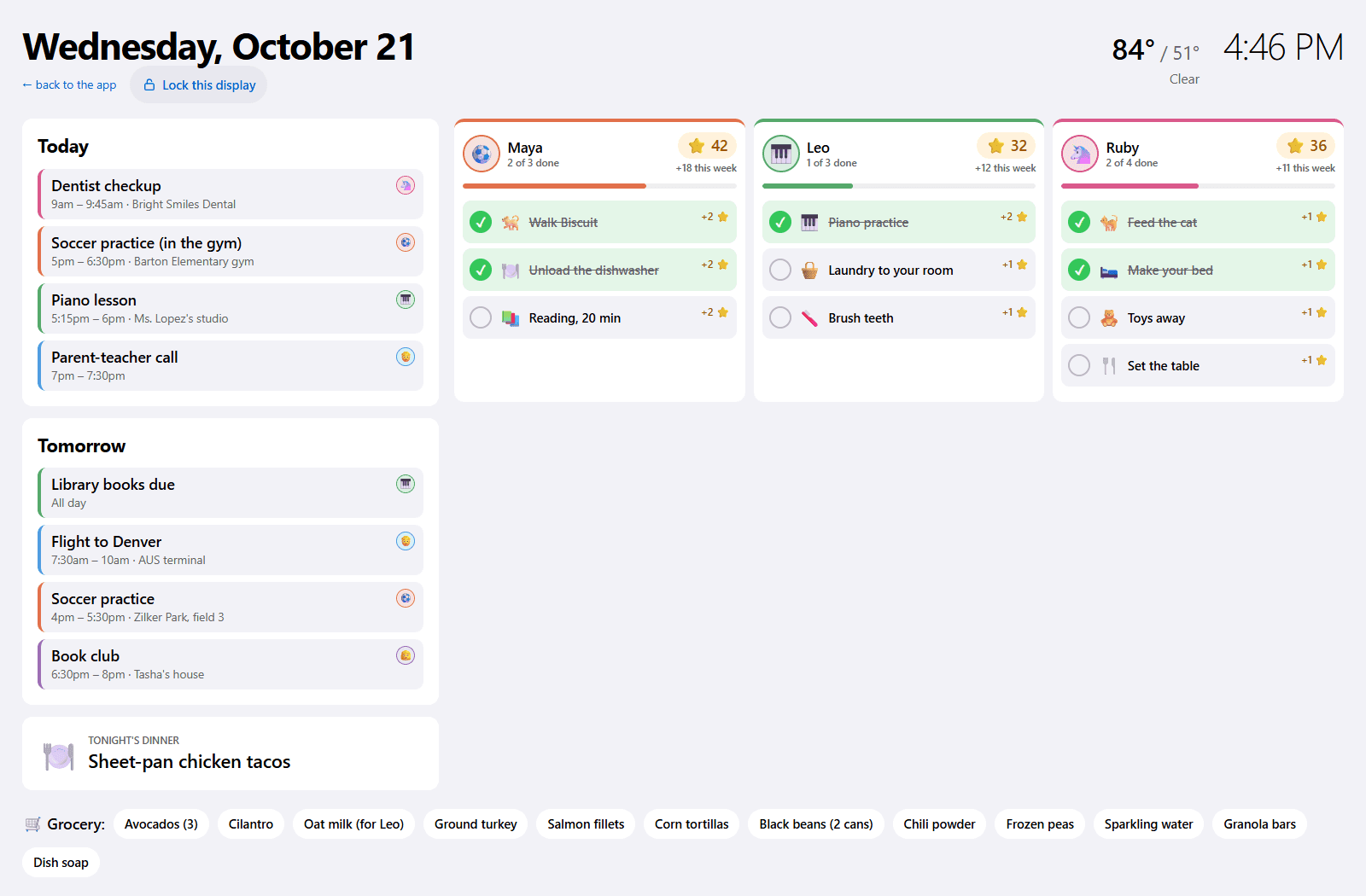
HouseChief chores earn stars and streaks and can rotate. Kids pick a reward; a parent confirms it before stars are spent. Kids need no email. Meals sit on a week grid, recipes send ingredients to an aisle-sorted grocery list, and HouseChief does not place the order. The wall display runs on a tablet you already own. It shows today, tomorrow, chores, dinner and the grocery list. HouseChief does not sell a screen.
When Ohai is the better fit
Pick Ohai if you want to text an assistant, if you want the iPhone and Android apps its how-it-works page describes, or if you want a person to help with a messy schedule. Ohai's home page FAQ says human assistants can step in when something is complicated, like a detailed school schedule or document. Pick Ohai if you want Instacart to deliver the groceries, or if adults in two homes need one shared system. How it works says circles coordinate even across households.
Pick HouseChief if the household is one home, kids should not need an email, and a calendar or meal change should wait for a parent to tap Approve. The rewards store is stars, and a parent confirms it before stars are spent. The wall is a tablet you already own.
How we checked
Checked November 9, 2026, on Ohai's home page and its how-it-works page. Those two pages describe plans differently, so this comparison does not list a price. See ohai.ai for current pricing, and see HouseChief's own site for HouseChief's. HouseChief is not affiliated with Ohai. The compare hub links the other dated pages.
HouseChief works in any browser on a phone, tablet or computer you already own. Sign up when you want it for your family.
Sources
Ohai is a trademark of its owner. HouseChief isn't affiliated with or endorsed by Ohai. Competitor details come from these official pages, as of November 9, 2026.
Questions
Does Ohai have chores and a rewards store?
Not on the Ohai pages checked November 9, 2026. Those pages describe calendars, tasks, meal planning and a text assistant. They do not describe chores, stars or a rewards store. In HouseChief, kids pick a reward, and a parent confirms it before stars are spent. Kids are profiles with no email. Check ohai.ai if you need a page newer than this one.
Does HouseChief work by text message?
No. HouseChief has no text-message assistant. You use it in any browser on a phone, tablet or computer, and you can add it to the Home Screen. Ask in HouseChief by typing or talking. Ohai's how-it-works page says you can text Ohai. That is a real difference, and it is one reason to pick Ohai if texting is how you want to capture the week.
Which fits two households, Ohai or HouseChief?
Ohai, if you need adults in two homes to share one system. Ohai's how-it-works page says shared circles let each adult connect calendars and coordinate, even across households. HouseChief is one household. Two homes do not share a family. A grandparent or sitter gets a read-only share link, with no account, and you can turn that link off.